



What Is AI
What Is AI? A Plain-English Guide From Someone Who Uses It Every Day
A few months ago, my uncle called me with a serious question. “Everyone keeps saying AI is going to take over. Is it in my phone? Is it listening to me?”
I started to answer, then realized I’d have to explain half of modern technology. So I gave him the short version: “It’s software that learns patterns from huge amounts of data, then uses them to make predictions or create things.”
He went quiet. Then he said, “So… like autocomplete?”
Honestly? Not a bad starting point. This article is the longer version of that conversation, minus the panic.
So what is AI, really?
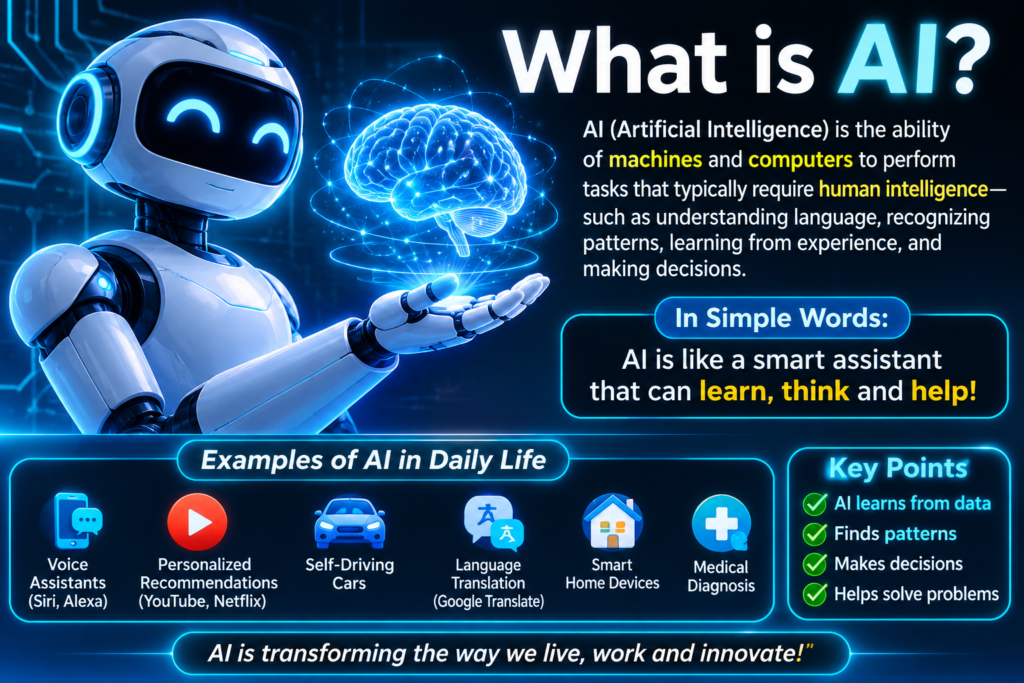
AI stands for artificial intelligence. It’s a broad label for computer systems that do things we normally associate with human thinking: understanding language, recognizing images, making recommendations, or writing text.
The important part is how it works. Traditional software follows rules a programmer wrote: “If the user clicks this button, do that.” AI is different. Instead of following fixed rules, it’s trained on enormous amounts of examples and learns patterns from them.
Think of how a kid learns what a dog is. Nobody hands them a rulebook. They see lots of dogs, and eventually they just know. AI learns in a loosely similar way, except it needs millions of examples, and it doesn’t truly “understand” anything the way a child does.
That last point matters, and I’ll come back to it.
You’re probably already using AI
When I first got into this, I assumed AI was something you had to go out and find. Turns out I’d been using it for years:
- Your phone’s keyboard suggesting the next word
- Google Maps predicting traffic and rerouting you
- Spotify and YouTube recommending things you might like
- Gmail filtering spam and finishing your sentences
- Face unlock on your phone
- Voice assistants like Siri, Alexa, and Google Assistant
None of these feel like robots from movies. They feel like normal features. That’s how most AI shows up in real life: quietly, inside tools you already use.
The newer kind: generative AI
What changed in the last few years is that AI got a chat box.
Tools like ChatGPT, Claude, Google Gemini, and Microsoft Copilot let you type a question or request in plain language and get a written answer. Others, like Midjourney, Adobe Firefly, and Leonardo AI, create images from text descriptions.
This is called generative AI, because it generates new content instead of just sorting or recommending existing stuff.
In simple terms, they’ve read a huge amount of text and learned which words tend to follow which. When you ask something, they build a response piece by piece based on those patterns.
That’s why it feels like talking to someone, and also why it can sound confident while being wrong.
My first real experience (and my first mistake)
The first time I used a chatbot seriously, I asked it to help me research a topic for a blog post. It gave me a smooth, well-organized answer with statistics and a couple of study names.
I almost pasted it straight into my draft.
Something felt off, so I searched for one of the studies it mentioned. It didn’t exist.
This is called a hallucination. The AI isn’t lying on purpose. It’s generating text that sounds right, and sometimes “sounds right” and “is true” aren’t the same thing.
That was my biggest early lesson: AI is a great assistant and a terrible authority. I now treat everything it says about facts, numbers, dates, or sources as a draft that needs checking.
How to start using AI without feeling lost
If you’ve never tried it, here’s the path I’d suggest. It’s what I walked my uncle through.
Step 1: Pick one tool, not five
Don’t sign up for everything. Choose one general chatbot, such as ChatGPT, Claude, or Gemini. Most have free tiers, though limits and features change, so check each site for current details.
Step 2: Start with a low-stakes task
Don’t begin with anything important. Try things like:
- “Explain how a mortgage works like I’m 12.”
- “Give me a 3-day meal plan using chicken, rice, and spinach.”
- “Rewrite this email so it sounds friendlier.”
Low stakes means you can learn how it behaves without consequences.
Step 3: Be specific
Vague questions get vague answers. Compare:
- Weak: “Write about fitness.”
- Better: “Write a beginner-friendly 20-minute home workout with no equipment, for someone who sits at a desk all day.”
Give context: who it’s for, what format you want, how long, what tone.
Step 4: Treat it like a conversation
My early mistake was giving up after one mediocre answer. These tools work best when you follow up: “Make it shorter,” “Use simpler words,” “Give me three alternatives.”
Step 5: Check anything that matters
Medical, legal, financial, or factual claims need verification from reliable sources. AI can help you understand a topic, but it shouldn’t be your final word on anything where being wrong has consequences.
Real situations where AI helped me
Here’s where it earned a permanent spot in my routine.
Untangling confusing topics. I asked a chatbot to explain a tax form’s wording in plain English. It didn’t replace a professional, but it helped me understand what questions to ask.
Getting unstuck on writing. Asking for a rough outline or a few opening lines gets me moving, even if I rewrite most of it.
Summarizing long stuff. I still skim the original if the details matter.
Quick images. For blog graphics, I use image tools like Leonardo AI or Adobe Firefly. They’re great for concepts and backgrounds, less so for anything needing exact text or real product accuracy.
Learning a new skill. Asking “what should I learn first, and in what order?” gave me a clearer roadmap than random YouTube searching.
Common mistakes to avoid
I’ve made most of these myself.
Trusting it blindly. Covered above, but it’s number one for a reason.
Sharing private information. Don’t paste passwords, banking details, ID numbers, or confidential work documents into a chatbot. Different tools handle data differently, so read the privacy policy and settings before sharing anything sensitive.
Copy-pasting without editing. Raw AI text often sounds flat and generic. If you publish it as is, readers notice, and search engines favor content with real value and original perspective.
Expecting it to know recent events. Some tools have a training cutoff or limited access to current information. For news or recent changes, verify with a live source.
Using it to avoid learning. I use it to speed me up, not to replace my thinking.
What AI can’t do (yet)
Here’s the honest part that hype often skips.
AI doesn’t truly understand things the way people do. It doesn’t have real-world experience, common sense, or feelings. It can mimic empathy in text, but it isn’t feeling anything.
It can also reflect biases from the data it was trained on, make confident mistakes, and struggle with unusual situations. That’s why human judgment still matters, especially for decisions affecting real people.
As for the fear my uncle had, whether it’s “listening to you”: voice assistants listen for wake words, and privacy settings vary by device and app. If you’re concerned, review the microphone and data permissions on your phone. That’s a practical step, not paranoia.
Will AI take your job?
I get this question a lot, and I don’t think anyone can answer it with certainty.
What I’ve seen is that AI tends to change tasks more than it replaces whole roles. People who learn to use it well often get more done. But some jobs will shift, and some tasks will disappear.
My advice: learn the basics, experiment with tools relevant to your field, and stay curious. Just don’t ignore it.
Final thoughts
Back to my uncle. After our conversation, he tried a chatbot to help plan a family trip. It suggested a route, and he caught a mistake in the opening hours of one attraction. He was oddly proud of that.
That’s the right mindset. It’s a powerful tool that works best when a curious, careful human is steering.
Start with one tool, ask one real question, and see what happens. You’ll learn more in ten minutes of trying than in an hour of reading about it.







Leave a Reply