


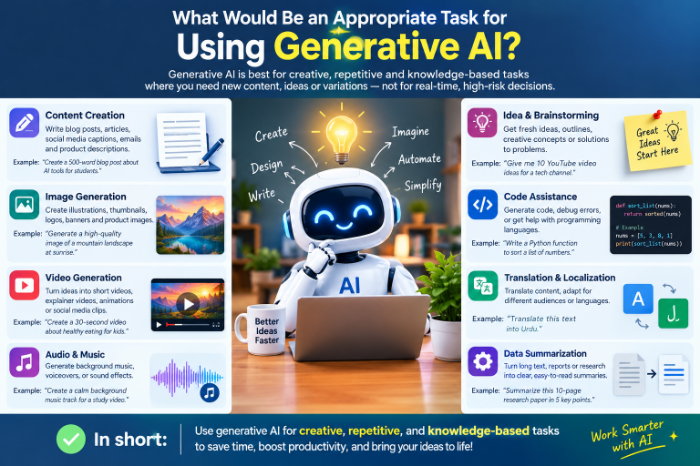
What Would Be An Appropriate Task For Using Generative AI
What Is a Good Task for Generative AI? Here’s What Actually Works
The first time I tried ChatGPT, I typed “write me a blog post about laptops” and hit enter.
What came back was grammatically perfect and completely forgettable. It sounded like a brochure written by someone who had never touched a laptop. I closed the tab and thought, “So this is the hype?”
A few weeks later, I tried it again, but this time to fix a problem I really had. I’d written a clumsy email to a client, and I couldn’t figure out why it sounded so rude. I pasted it in and asked, “Why does this sound passive-aggressive? Rewrite it in a friendlier tone but keep the deadline firm.”
That worked. It worked so well that I started wondering what else I’d been getting wrong.
If you’re staring at a blank chat box wondering what to ask, this is for you. I’ll share which tasks have been worth it for me, which ones wasted my time, and a simple way to decide for yourself.
The Quick Rule I Use Now
Generative AI is great when the first draft is the hard part, and weak when being correct is the hard part.
Writing a first draft, brainstorming, summarizing, and reformatting are all things where a rough version is useful and you can easily fix it. Looking up a precise legal rule, a medical dose, or a statistic is a different story, because a confident wrong answer can cause real trouble.
Keep that in mind and the rest gets easier.
7 Tasks Where Generative AI Is Genuinely Useful
1. Rewriting things you’ve already written
This is my favorite starting point because you stay in control. You provide the content, and the AI helps with tone and clarity.
Paste in a message and try prompts like:
- “Make this shorter without losing the main point.”
- “Rewrite this so it sounds polite but direct.”
- “Explain this to someone who has never heard of the topic.”
I use this for emails, support replies, and even awkward text messages. It’s low-risk because I’m the one who knows what I meant.
2. Summarizing long, boring material
Long PDFs, meeting transcripts, and 40-message email threads are all good candidates. Tools like ChatGPT, Claude, and Google’s NotebookLM handle documents well, and NotebookLM is especially handy when you want answers tied to your own files.
My routine looks like this:
- Upload or paste the document.
- Ask for a summary in five bullet points.
- Ask, “What decisions or action items are in here?”
- Skim the original for anything that sounds important.
That last step matters. A summary is a map, not the territory.
3. Breaking through a blank page
Staring at an empty document is a special kind of misery. I now ask the AI for a rough outline, then rewrite it in my own words and ignore half of it.
Ask for three different angles, or ten possible titles. Most will be mediocre, but one often sparks something better. Think of it as a brainstorming partner who never gets tired, not as a ghostwriter.
4. Learning something new at your own pace
This one surprised me. Asking an AI to explain a concept five different ways is great for learning.
Some prompts I like:
- “Explain how interest rates affect mortgages like I’m 12.”
- “Give me a real-world analogy for this.”
- “Quiz me on this topic, one question at a time.”
You can ask the “dumb” follow-up question as many times as you want. Just double-check anything important against a trusted source, since explanations can sound confident even when a detail is off.
5. Writing and debugging simple code or formulas
I’m not a developer, but I constantly fight with Excel and Google Sheets. Describing what I want in plain English (“sum column C only if column A says ‘Paid’ and the date is in March”) gets me a working formula in seconds.
For coding, tools like GitHub Copilot, Claude, and ChatGPT are good at small scripts, explaining error messages, and translating code between languages. Always test the result. I once used a formula that looked perfect and quietly ignored half my rows.
6. Planning and organizing
Trip itineraries, weekly meal plans, study schedules, and event checklists are great jobs for AI, because the structure is the whole point.
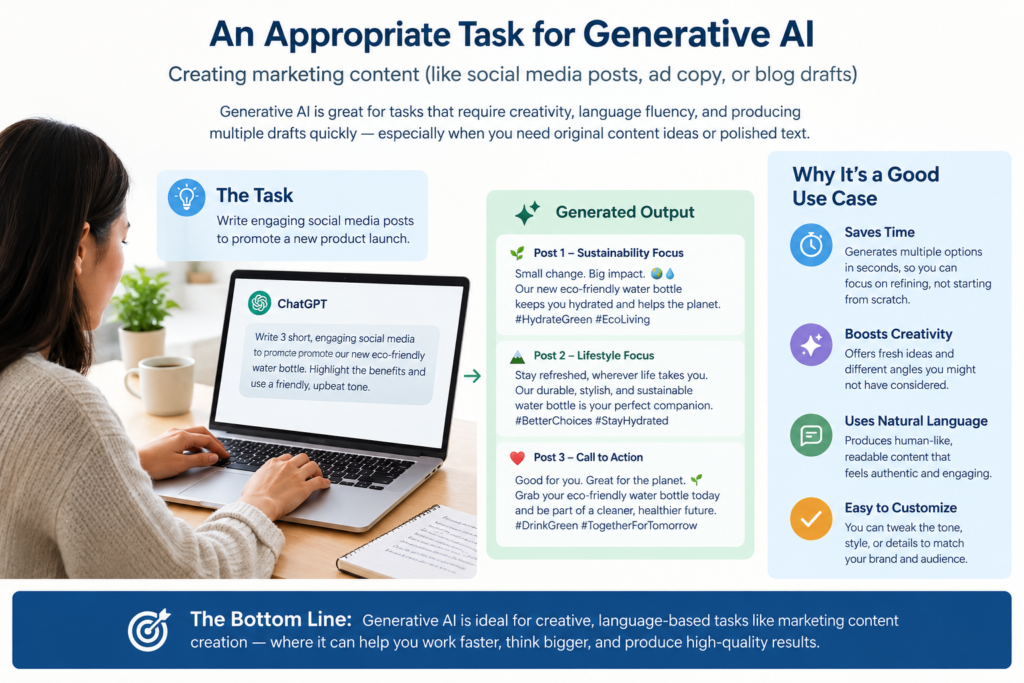
A prompt that worked for me: “Plan a 3-day trip to a small mountain town for two adults on a modest budget. We like hiking and hate crowds. Give me a rough day-by-day plan and tell me what I should verify myself.”
That last sentence is useful. It reminds the AI (and me) that opening hours, prices, and road conditions need checking.
7. Creating images and simple visuals
Tools like Canva’s AI features, Adobe Firefly, and Midjourney are handy for blog thumbnails, presentation graphics, and mood boards. I wouldn’t use them for anything where accuracy matters, like diagrams or product photos. Text inside AI images is still hit-and-miss.
A Simple Step-by-Step Way to Start
If you’re new, don’t try to “learn AI.” Just pick one small, annoying task this week.
Step 1: Choose something low-stakes. Not a contract or a medical question.
Step 2: Give context. Instead of “write an email,” try: “I’m a freelance designer. A client is two weeks late paying an invoice. Write a polite, firm reminder.”
Step 3: Read the first answer critically. It’s rarely perfect. That’s normal.
Step 4: Iterate. Say things like “shorter,” “less formal,” or “remove the first paragraph.” This back-and-forth is where the value is.
Step 5: Edit it yourself. Add your own details, fix anything that doesn’t sound like you, and check any facts.
That’s it. No special prompt formulas required.
Where It Burned Me (Mistakes to Avoid)
Here’s the honest part. These are the situations where I’ve seen generative AI fall short.
Trusting facts and sources. AI can invent statistics, quotes, and even links that look real. If a claim matters, find it in a reliable source. Never publish a number you haven’t verified.
Pasting private information. Be careful with client data, passwords, financial details, or anything confidential. Check the privacy settings of the tool you use, and if in doubt, leave it out.
Publishing without editing. Raw AI text tends to be bland, repetitive, and a little too tidy. Readers can tell, and so can search engines that favor helpful, original content. Add your own examples and opinions.
Using it for high-stakes advice. Medical, legal, and financial decisions deserve a qualified professional. AI can help you understand the basics and prepare questions, but it’s not a replacement.
Asking vague questions. “Give me marketing tips” gets you generic filler. “Give me three low-cost ways a local bakery can get more weekday customers” gets you something usable.
So, Which Task Should You Try First?
If you want my honest recommendation, start with summarizing or rewriting something you already have. It’s quick, you can judge the quality instantly, and the risk is tiny.
Once that feels comfortable, move on to brainstorming, learning, and planning. Save the high-stakes stuff for people who are accountable for the answer.
Generative AI isn’t magic, and it won’t replace your judgment. But when I stopped asking it to do my thinking and started asking it to handle the tedious parts, it became one of the more useful tools on my computer.
Got a task you’re not sure about? A good test is to ask yourself, “If this came out slightly wrong, could I easily catch and fix it?” If yes, give it a shot.






Leave a Reply