


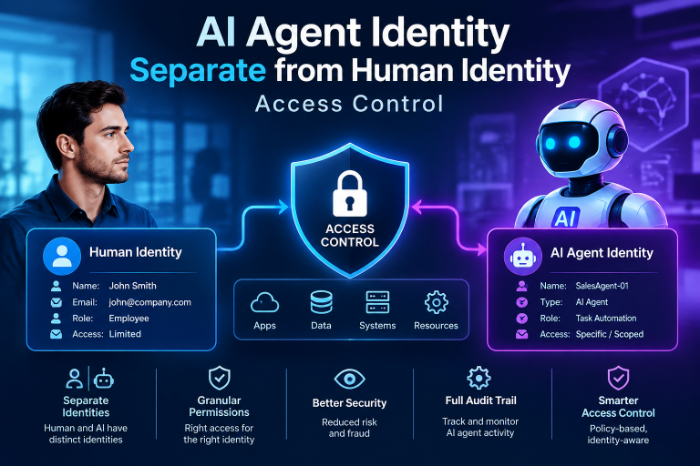
AI Agent Identity Separate From Human Identity Access Control
Why I Stopped Letting My AI Agents Log In As Me (And What Happened Next)
Three months ago, I got a Slack message at 2 AM from our security lead. Subject line: “Can we talk about what your bot did last night?”
Turns out, an automation script I’d built to pull data from our CRM had gone a little haywire during an API update. It didn’t just fail quietly like scripts usually do. It started hitting endpoints it had no business touching, using my personal credentials, under my name, in the audit logs.
My name. On actions I never took. At 2 AM.
That was the night I actually understood why “AI agent identity” is a real thing, not just some compliance buzzword security teams throw around to justify more paperwork.
The Problem Nobody Warns You About
When you’re building automations, bots, or AI agents — whether it’s a simple Zapier flow, a custom script hitting an API, or a full-blown agent using something like AutoGPT or a Claude-powered tool — the laziest path is always the same.
You just… use your own login.
Your API key. Your OAuth token. Your admin access. It’s sitting right there, it already has permissions, and setting up a separate identity feels like extra work for something that’s “just a script.” AI Agent Identity Separate From Human Identity Access Control
I did this for almost two years before it bit me.
The problem is simple once you see it: when a human and a machine share one identity, you lose the ability to tell them apart. Every log, every audit trail, every “who did this” question gets muddy. And when something goes wrong — and with AI agents, especially ones making autonomous decisions, something eventually goes wrong — you can’t isolate it, can’t revoke it cleanly, and can’t prove what actually happened.
What “Separate Identity” Actually Means (No Jargon Version)
Forget the enterprise security whitepapers for a second. Here’s the plain version.
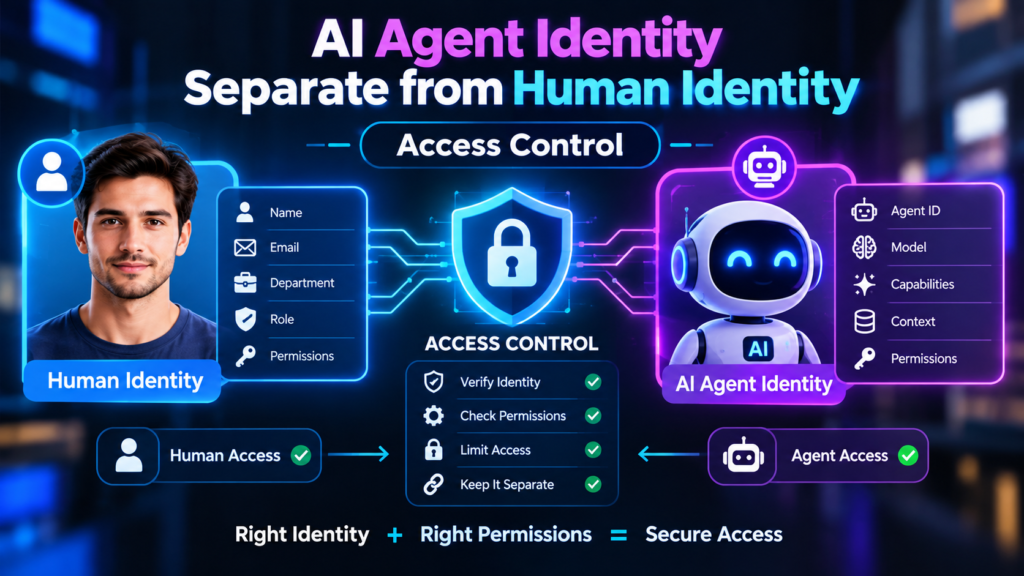
Think of your AI agent like a new employee, not like an extension of yourself. You wouldn’t give a new hire your personal email password and call it “onboarding.” You’d give them their own account, their own badge, their own login, with access to exactly what their job requires.
That’s it. That’s the whole concept.
The agent gets:
- Its own identity (a service account, machine identity, or agent-specific credential)
- Its own permissions (scoped to only what it needs)
- Its own audit trail (so logs show “Agent X did this,” not “you did this”)
- Its own lifecycle (you can disable it without disabling your own access)
It did not feel obvious at 2 AM staring at logs that said I’d exported customer data I never touched.
How I Actually Fixed My Setup
I’m not a security engineer. I’m a guy who builds automations and occasionally breaks things. So this isn’t a textbook approach — it’s what actually worked when I redid my setup.
Step 1: I audited every script and bot that used my credentials
This took longer than I expected. I went through GitHub repos, Zapier connections, Make.com scenarios, and a handful of Python scripts running on a cron job on an old DigitalOcean droplet. Almost every single one used my personal API key or OAuth token somewhere. AI Agent Identity Management Separate Access from Humans 2026
Step 2: I created dedicated service accounts for each agent
Most platforms support this even if they don’t advertise it well. In Google Workspace, this meant setting up actual service accounts through Google Cloud IAM instead of using my personal Google login. For Slack bots, I created dedicated bot tokens instead of using a user token tied to my account. For GitHub Actions, I switched from personal access tokens to fine-grained tokens scoped to specific repos.
Step 3: I scoped permissions down to almost nothing, then added back only what broke
I started each agent with close to zero permissions and ran it until something failed, then added just enough access to fix that specific failure. Slower process, way tighter security.
Step 4: I set up separate logging so I could actually see what each agent was doing
This mattered more than I expected. Once agents had their own identities, the audit logs suddenly became readable. I could see “Inventory-Sync-Bot updated 40 records” instead of my name showing up for something I didn’t personally do.
Step 5: I gave every agent an expiration or review date
Credentials that never expire are how you end up with a bot still running two years after the project it supported got cancelled. I calendar-reminder myself every 90 days to review active service accounts and kill anything unused.
Real Example: The Chatbot That Taught Me This the Hard Way
We had a customer support chatbot built on top of an AI model, connected to our helpdesk software (Zendesk, in our case) so it could pull ticket history and respond to common questions.
Originally, it authenticated using an admin’s Zendesk login because “it needed full access to look things up properly.”
A few weeks in, someone on the team changed that admin’s password as part of routine security hygiene. The bot broke instantly, mid-conversation, with actual customers watching a chat go dead. AI Agent Identity Separate From Human Identity Access Control
Worse, when we dug into why it had needed full admin access at all, the answer was: it didn’t. It only ever read ticket data and posted replies. It never needed billing access, user management, or account settings — all of which came bundled with that admin login.
We rebuilt it with a dedicated Zendesk API token scoped to read tickets and post comments only. Nothing else. It’s been rock solid since, and when we eventually retire that bot, we can revoke exactly one token without touching any human’s account.
Common Mistakes I See (Because I Made All of Them)
Mistake 1:
Small scripts have a way of growing into critical infrastructure nobody remembers to secure properly. Treat every agent like it might become permanent, because eventually one will.
Mistake 2: Giving agents way more access “just in case.”
This is the Zendesk bot problem. Over-permissioning feels safer in the moment and is actually the opposite. Scope tight, expand only when something breaks.
Mistake 3: Sharing one service account across multiple agents.
I did this to save time — one Google service account powering three different scripts. When one script misbehaved, I couldn’t tell which one without digging through code, because the logs all showed the same identity.
Mistake 4: Forgetting agents need offboarding too.
When a project ends, people remember to revoke human access. Nobody remembers the bot that’s still quietly running with valid credentials months later.
Mistake 5: No monitoring on the agent identity itself.
Creating a separate identity doesn’t help much if you never look at what it’s doing. Set up alerts for unusual activity on service accounts the same way you would for a human account.
Tools That Actually Made This Easier
If you’re doing this on a budget or without a dedicated security team (like me), a few things helped a lot:
- 1Password or Bitwarden for storing service account credentials separately from personal ones, with shared vaults for team access
- Google Cloud IAM / AWS IAM for creating genuinely scoped service accounts instead of reusing personal cloud logins
- GitHub fine-grained personal access tokens instead of classic tokens with broad repo access
- Okta or Auth0 if you’re managing enough agents that you need centralized identity management for machine identities too, not just humans
None of these require a massive budget. Most of it is just discipline and a couple hours of setup per agent.
Final Thoughts
The uncomfortable truth is that AI agents are only going to get more autonomous, not less. They’re going to make more decisions, touch more systems, and act faster than any human reviewing logs after the fact.
If your agent’s actions are indistinguishable from your own in every system log, you’re not just creating a security risk — you’re creating a situation where you genuinely can’t prove what happened when something goes wrong. And with AI agents specifically, something eventually goes a little wrong.



Leave a Reply