


How To Report Kindle Book For Using AI
How to Report a Kindle Book for Using AI (Without It Being Disclosed)
Last month I bought a “self-help” Kindle book about morning routines. Twelve bucks, decent cover, good reviews (or so I thought). By chapter three I was staring at the same three sentences rephrased four different ways, a random paragraph that suddenly switched from “you” to “one,” and a section that confidently told me to “consult with your AI assistant” — which, yeah, kind of gave the game away.
I wasn’t mad because a computer helped write it. I use AI tools myself, for outlines, for editing, for bouncing ideas around. I was mad because it was obviously slapped together in an afternoon, sold like a real book, and nowhere did it say “hey, this was machine-generated.” That’s the actual problem — not the AI part, the hiding it part.
So I went down the rabbit hole of figuring out how to actually report something like this to Amazon. It took me longer than it should have, mostly because Amazon doesn’t exactly put a big red “Report AI Book” button on the page. Here’s everything I learned, including the dead ends.
First, know what you’re actually reporting
This tripped me up at the start. There isn’t really a category called “this book used AI.” Amazon’s rule for authors (Kindle Direct Publishing, or KDP) is that if AI generated the content — text, cover art, or translations — the author has to disclose that when they publish. It’s an internal checkbox Amazon uses for its own records. Readers never see a little “AI-Generated” badge on the product page, even when a book is disclosed properly.
So the actual violation you’re flagging isn’t “AI was used.” It’s one of these:
- Undisclosed AI content — the author almost certainly generated it with a tool and never checked the disclosure box.
- Poor customer experience — repetitive, low-effort, barely-edited text that wastes your money.
- Misleading listing — the description, title, or reviews make it look like a professionally written human book when it isn’t.
- Plagiarism or scraped content — some AI books are just other people’s writing, run through a paraphraser.
Knowing which bucket your complaint fits into makes a real difference in how fast Amazon actually looks at it. “This is AI” on its own is vague.
Step 1: Grab your evidence before you do anything else
I made the mistake of reporting my morning-routine book first and screenshotting later. Don’t do that — by the time I went back, the “look inside” preview had been updated by the publisher. How To Report Kindle Book For Using AI
Before you report anything:
- Screenshot the specific pages or chapters that read like AI output (repetitive phrasing, weird tense shifts, generic “as an AI language model” leftovers — yes, this genuinely happens when authors forget to delete the tool’s own disclaimers).
- Note the exact book title, author name, and ASIN. You’ll find the ASIN under “Product details” on the book’s page, or in the URL after /dp/.
- If you bought it, keep your order confirmation. Reports from verified purchasers seem to get taken more seriously, in my experience anyway.
Step 2: Use Amazon’s “Report an issue” link on the product page
This is the one most people miss because it’s small. On the desktop site:
- Go to the book’s product page.
- Scroll down past the description, past the reviews section header.
- Look for a small link that says something like “Report an issue with this product or seller.” On some pages it’s tucked near “Product details,” on others it’s lower down by the reviews.
- Select the option closest to your issue — usually something like “The product detail page has incorrect information” or a general content/quality complaint.
- In the free-text box, be specific been disclosed as AI content per KDP policy. This misrepresents the product to buyers.”
- Attach your screenshots if the form allows it.
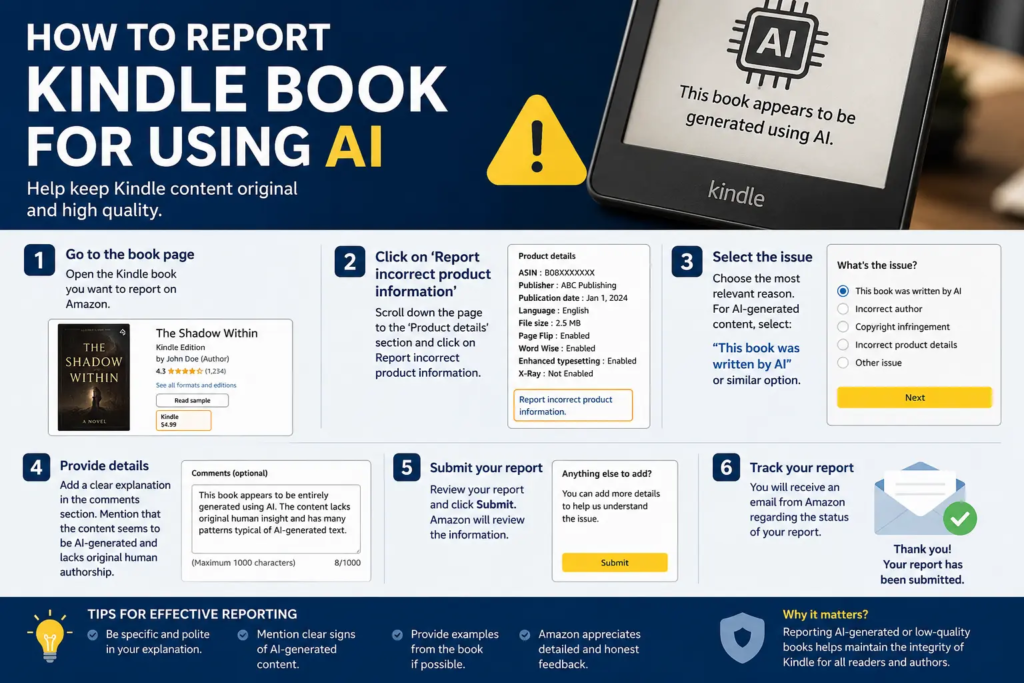
On the mobile app, it’s under the three-dot menu (•••) on the product page, then “Report incorrect product information” or similar wording depending on your app version.
Step 3: Contact Amazon Customer Service directly
The report form sometimes feels like it disappears into a void — I never got a personal reply from mine, just a generic “thanks for your feedback.” If you want an actual response, go through customer service instead or in addition:
- Go to Amazon’s Help section and choose to chat or call.
- Tell them plainly: “I’d like to report a Kindle book that appears to violate KDP’s content guidelines — specifically, undisclosed AI-generated content and poor customer experience.”
- Give them the ASIN and title right away. Agents move faster when they don’t have to search for the book themselves.
- Ask for a case number. This matters — if nothing happens in a week or two, you can reference that case number when you follow up.
Amazon has said it uses a mix of automated detection and human review for these reports, and looks at your submission history too, so vague or repeated frivolous reports can actually work against you. Be accurate, not dramatic.
Step 4: If it’s a Kindle Unlimited or straight-up scam listing, flag it as a review too
This isn’t a replacement for reporting it, but leaving an honest review that mentions the AI-generated feel of the writing helps other readers dodge the same $12 mistake I made. Amazon won’t let you say “this is definitely AI” as a factual claim if you can’t prove it, but you can absolutely describe what you noticed — repetitive structure, generic advice, filler chapters — without making unverifiable accusations.
What actually happens after you report
Based on what I’ve seen and read from other authors and readers dealing with this:
- If it’s a clear case (obvious AI leftovers, near-duplicate of another book, spammy pattern), Amazon can pull the title from sale fairly quickly.
- If it’s borderline (AI-assisted but genuinely edited, just not great writing), don’t expect much movement. Amazon has been pretty clear that disclosed, edited AI content is allowed to be sold — the bar for removal is deception or low quality, not the tool used.
- Repeat offenders — accounts that keep publishing undisclosed AI content — do face escalating consequences on the publishing side, up to account suspension for the author. But that’s Amazon’s internal enforcement, not something you’ll get a play-by-play on as the reporter.
Mistakes I made (so you don’t have to)
- I reported it as “this is written by ChatGPT” in my first attempt, with zero specifics. Got a generic auto-reply and nothing else. Being specific about why it reads that way got a much better response the second time.
- I assumed there’d be a dedicated “AI content” report category. There isn’t. You’re reporting it under the closest existing policy violation (misleading listing, poor quality, guideline violation).
- I didn’t keep my receipt handy. When customer service asked “did you purchase this?” I had to go dig through my orders while on chat, which slowed things down.
- I expected a personal follow-up every time. Sometimes you get one, sometimes you get silence and the book just quietly disappears a few weeks later. Both outcomes count as it working.
A quick note if you’re an author worried about false reports
If you’re on the other side of this — someone reported your legitimately AI-assisted (not AI-generated) book — don’t panic. Amazon’s own guidance draws a line between content you wrote and then polished with AI tools (no disclosure needed) versus content AI produced from your prompts (disclosure needed). If your book got flagged unfairly, you can respond through KDP support with your drafting history, and competitors falsely reporting books to knock them down a ranking is, unfortunately, a known tactic people have complained about for years. Keep your drafts and version history just in case. How To Report Kindle Book For Using AI
Final thought
I’m not anti-AI-in-publishing. Some of the best writing advice I’ve gotten recently came from bouncing ideas off an AI tool before I sat down to write. What bugs me is buying something marketed as a thoughtfully written book and getting a barely-edited output dump instead, sold at full price with five-star reviews that read suspiciously similar to each other too.
Reporting these books isn’t going to fix the flood of low-effort titles overnight. But every specific, well-documented report does seem to nudge things in the right direction, and it’s a lot better than just leaving a one-star review and moving on.






Leave a Reply